Isometric FPS Framework
Solo Developer
Built as part of a team dev project to build an isometric extraction shooter, this project includes the sum of my personal code contributions to that project, and now forms the basis of a 3D isometric twinstick shooter template. The project includes controllers for bipedal animation rigs, a player controller, a framework for state based AI controllers, an event driven HUD implementation, equipment system and much more.
Features
Generic Animation Controller
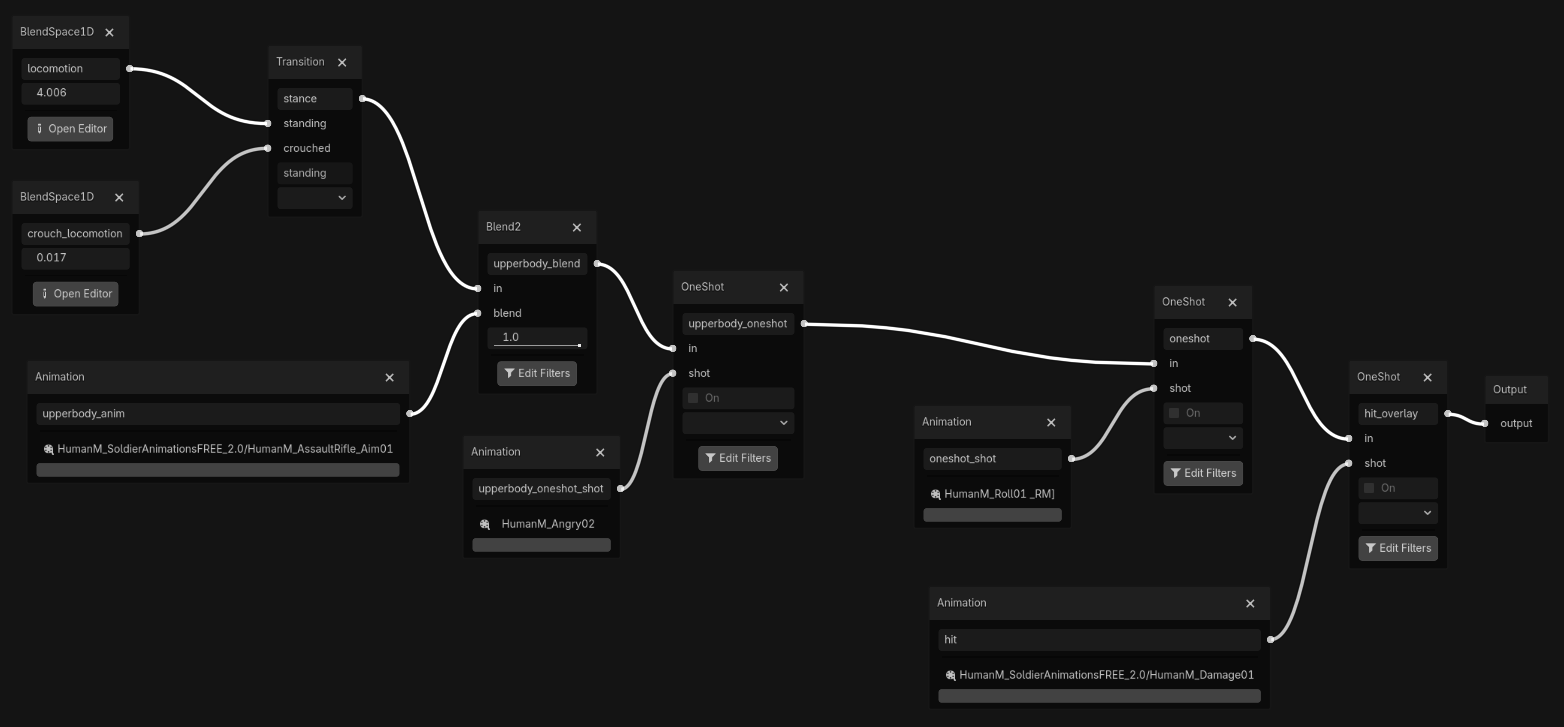
A single generic tree-structured animation controller is used for both the player and enemies, using godots implementation of the observer pattern to read when specific animations should be triggered, and using a shared AnimState class to read relevant state information from the parent controller to drive anim behaviours.
Footsteps
A callback is fired whenever a footstep is executed, allowing for perfectly timed footstep sfx to be played by the controller.
Equipment Overlay
Equippable items hold additional animation data which is read through the AnimState and used to drive animations for holding and using items. In the demo project, this is used to drive hold and fire animations for the rifle as well as the hold and use animations for the healing stimms.
Held Item Source
class_name HeldItem extends Node3D
var upperbody_anim: StringName = &""var use_anim: StringName = &""var use_look_ik: bool = falsevar source: Node = null
var can_move_while_using: bool = truevar can_run_while_using: bool = truevar lock_hotbar_while_using: bool = falsevar is_in_use: bool = false
signal cast_requested(duration: float, action_label: String)signal cast_cancel_requested()
Look IK
IK Modifiers for the upper body allow the controller to look in different directions to their target. This is especially useful for reactive NPCs, as well as correcting aim missalignment on animations for weapons like the rifle.
Stance System
A basic stance system allows the player to swap between full-body stances such as standing or crouched, with the possibility to extend it into idle, death, injured and more using the same setup.
Animation-Synced Locomotion Animations
Variable driven blend spaces drive seamless playback-synced transitions between idle, walk and run animations with full 8-direction locomotion calculated based on the controllers facing direction and velocity.
Hit Overlays
The final layer of the animation tree layers an addative hit reaction or “flinch” overlaying the resulting animation state.
Player Controller
The player controller is built using a state machine implementation of my own design, swapping between high level states for standing, crouched, dodge and dead. Single-class implementations of substate machines are used to determine substate logic, keeping a tighter seperation between high level controller states, reducing transition complexity and maintaining more maintainable code.
State Machine Source
var state: States = States.STANDINGvar prev_state: States = States.STANDINGvar _state_resource: ControllerState
enum States { STANDING, CROUCHED, DODGE, DEAD }
var state_scripts: Array[Resource] = [ PlayerStanding, PlayerCrouched, PlayerDodge, PlayerDead ]
func change_state(new_state: States) -> void:  if state == new_state:    return  if _state_resource:    _state_resource.exit()  prev_state = state  state = new_state  _state_resource = state_scripts[new_state].new(self)  _state_resource.enter()  state_changed.emit(state, _state_resource)
Abstract State Source
extends RefCountedclass_name ControllerState
var player: Player
func _init(ship: Player) -> void:  player = ship
func enter() -> void:  pass
func exit() -> void:  pass
func update(_delta: float) -> void:  pass
Mouse Aim
By projecting a ray from the mouse screen interecting the imaginary XZ plane of the player controller, we are able to rotate the controller to face the direction aimed at by the mouse. The XZ plane is offset by 1.2m allowing the player to more comfortably aim at chest high objects.
Camera Controller
The camera controller sits as its own independant module on the character. Using rightclick to rotate the camera, the camera controller stores and hides the cursor position, restoring it when the camera rotation is done.
Constraints have been added giving programmers the ability to set initial transform offsets as well as configure minimum and maximum zoom and pan constraints.
State Based AI Controllers
Enemies use the same animation controller as the player, and implement a very similar state machine pattern, making them very easy to implement.
The enemies in the Demo have states for Idle, Chasing, Alert, Attacking and Dead. They utilise an “unarmed” item type which handles the animation data and gameplay logic for enemies to attack the player, including settings enable for disable controllers abilities to walk or run while using specific items.
Aggro/Perception System
Enemies use an accumulation based aggro system, with perception impulses such as noise and vision incrementing a bucket variable. If the bucket overflows, the player aggros on the source of the last stimulai that it received. If no stimulai is received for a grace period, the bucket slowly empties again.
A noise subsystem is used to allow any gamecode to easily send noise signals, usually passing a reference to itself as a stimulai source. This is used for stuff like walking, gunfire and loud interactions.
Equipment System
The equipment system allows players to hold and use various different items. Items contain their own animation data which is injected into the animation controller to drive animation states for holding and using different items in the game world.
The demo project features an assault rifle, a relic scanner and healing stimms.
HUD System
The HUD system makes full use of Godots implementation of the observer pattern, binding itself to events within the player controller in initialization, eliminating any need for polling and streamlining the flow of data through through the class scene.
The demo HUD features indicators for collectables gathered, player health, held items, item-specific ammo counts and a cast bar.